
Shopify Wrong Address After Order? How to Fix It (2026)
Shopify Wrong Address After Order? How to Fix It (2026)
Shopify Wrong Address After Order? How to Fix It (2026)

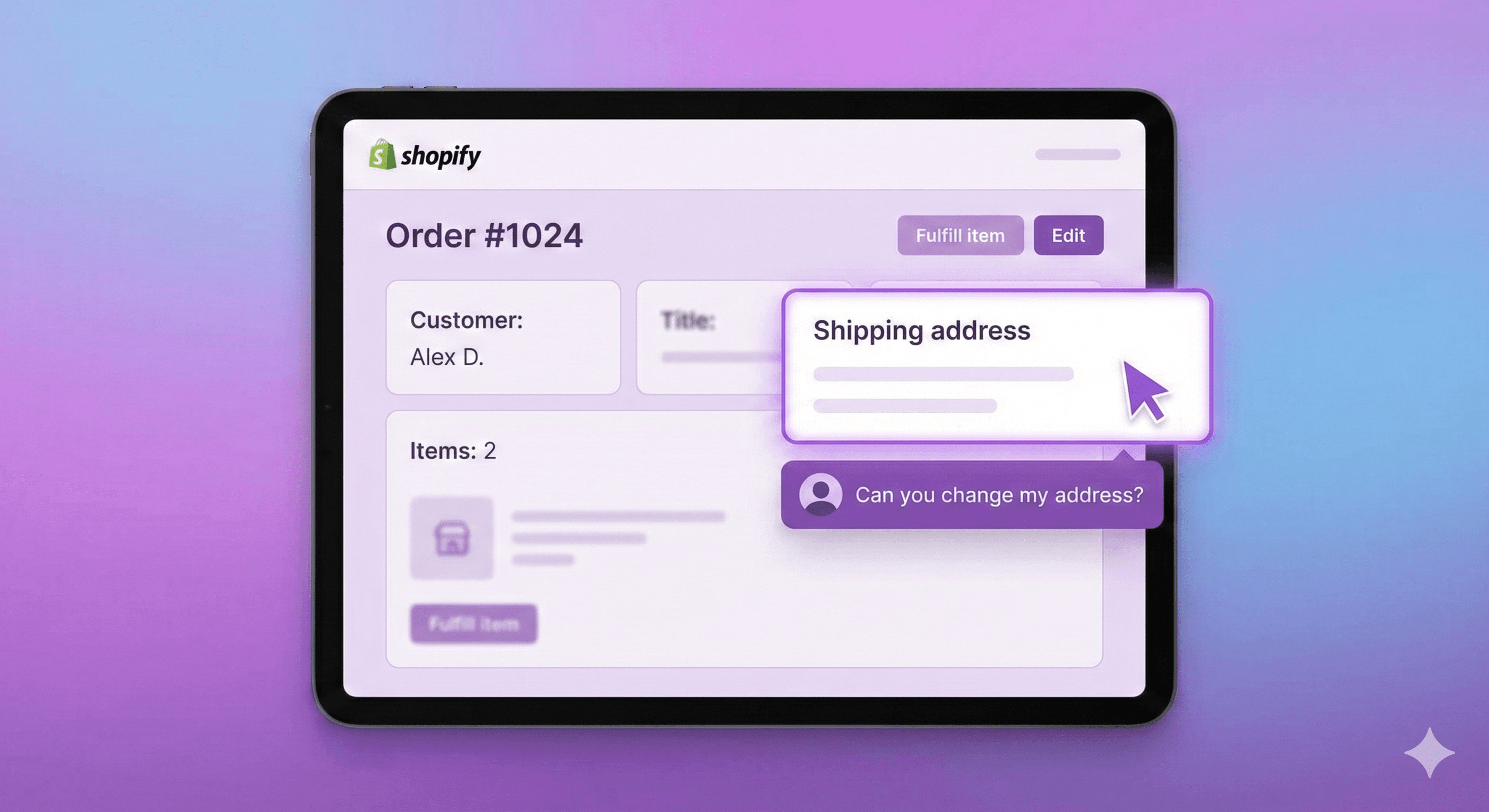
"Hi, I just placed an order but I put in the wrong address. Can you fix it?"
If you run a Shopify store, you've seen this email. Probably today. Maybe twice.
Address change requests are one of the most common support tickets in e-commerce, and the data backs that up: shipping-address changes are the #1 post-purchase edit, accounting for 30.2% of all edited orders (Revize, 2026). Customer was shipping to their office but checkout autofilled their home address. They're traveling and need it sent somewhere else. They moved last month and forgot to update their saved address.
The frustrating part? Shopify doesn't make this easy to fix.
This guide covers every method to change a shipping address after an order is placed—what works, what doesn't, and how to stop these tickets from hitting your inbox in the first place.
Can You Change a Shipping Address on Shopify After Checkout?
The short answer: Yes, but it depends on the order status.
Here's the reality:
Order Status | Can You Change Address? | Method |
|---|---|---|
Unfulfilled | Yes | Edit order or cancel/recreate |
Partially fulfilled | Limited | Only for unfulfilled items |
Fulfilled | No | Contact carrier directly |
Archived | No | Too late |
Shopify's native order editing has improved over the years, but address changes remain clunky. There's no dedicated "change address" button—you have to know where to look and understand the limitations.
Let's walk through each method.
Method 1: Edit the Order Directly (Native Shopify)
This is the simplest approach for unfulfilled orders, but it comes with a catch most merchants don't realize.
Step-by-Step Process
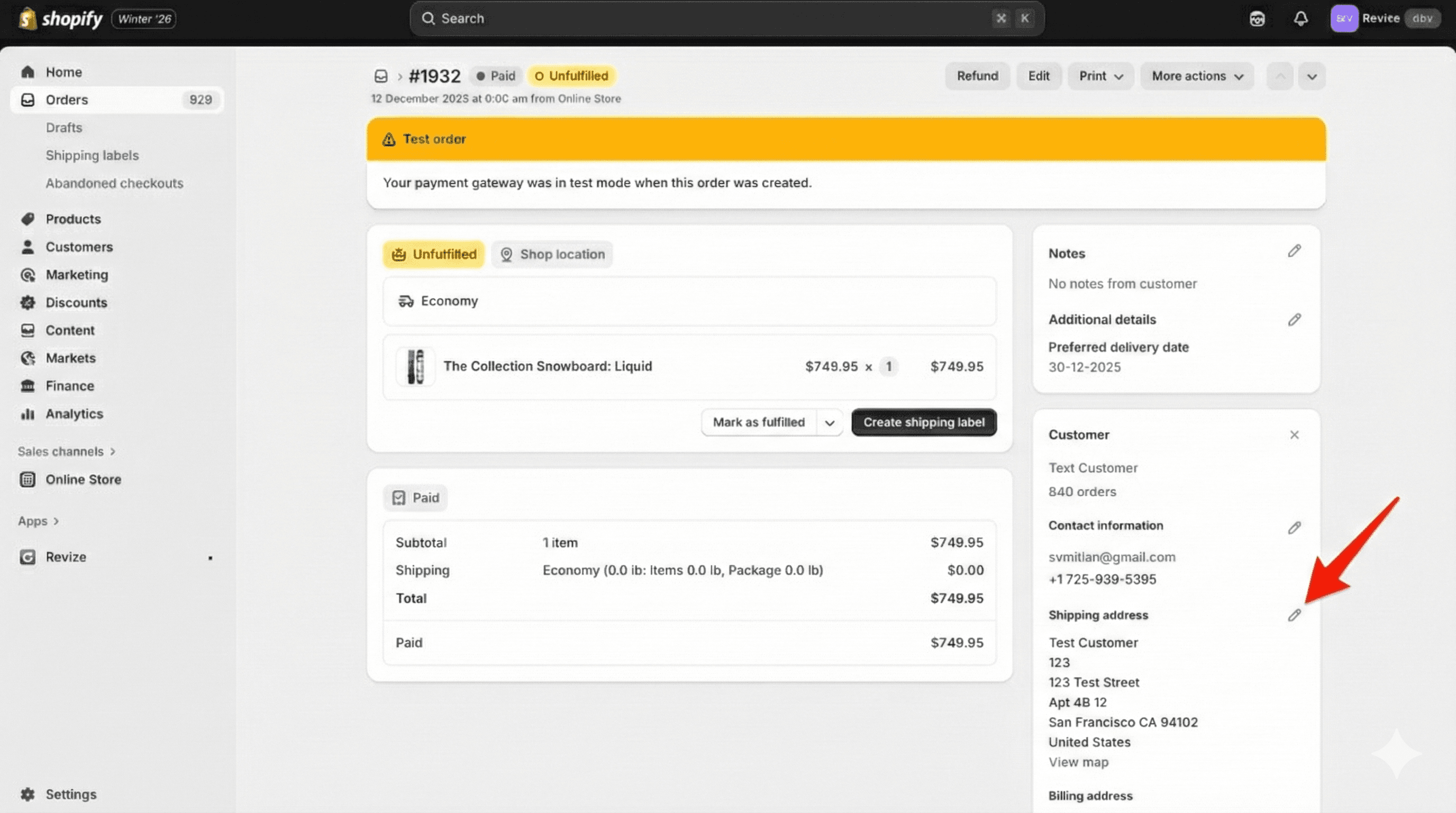
Go to Orders in your Shopify admin
Click on the order you need to modify
In the Shipping address section, click the pencil icon (Edit)
Update the address fields
Click Save
That's it for the address itself. But here's what Shopify doesn't tell you upfront:
The Shipping Cost Problem
When you edit a shipping address, the shipping cost doesn't automatically recalculate.
If a customer ordered with free local delivery and now wants it shipped to another state, you're stuck with:
Option A: Honor the original shipping cost (you eat the difference)
Option B: Manually calculate the new rate and request additional payment
Option C: Cancel and ask them to reorder (terrible customer experience)
None of these are good. For stores with zone-based or weight-based shipping, a simple address change can mean a $15+ swing in shipping costs that Shopify won't catch automatically.
The same problem exists for taxes. A customer changing from Oregon (no sales tax) to California (up to 10.25%) creates a tax liability Shopify won't automatically capture. You're either eating the cost or manually chasing the customer for a few extra dollars.
Self-service tools like Revize- Order Editing & Upsell handle this automatically—when a customer changes their address, shipping costs, taxes, and even warehouse assignment recalculate in real-time. No manual adjustments, no revenue leakage.
When This Method Works Best
Address typos (wrong apartment number, misspelled street)
Same shipping zone changes (across town, not across country)
Orders where you offer flat-rate shipping anyway
When This Method Falls Short
Customer moving to a different shipping zone
International address changes
Orders with calculated shipping rates
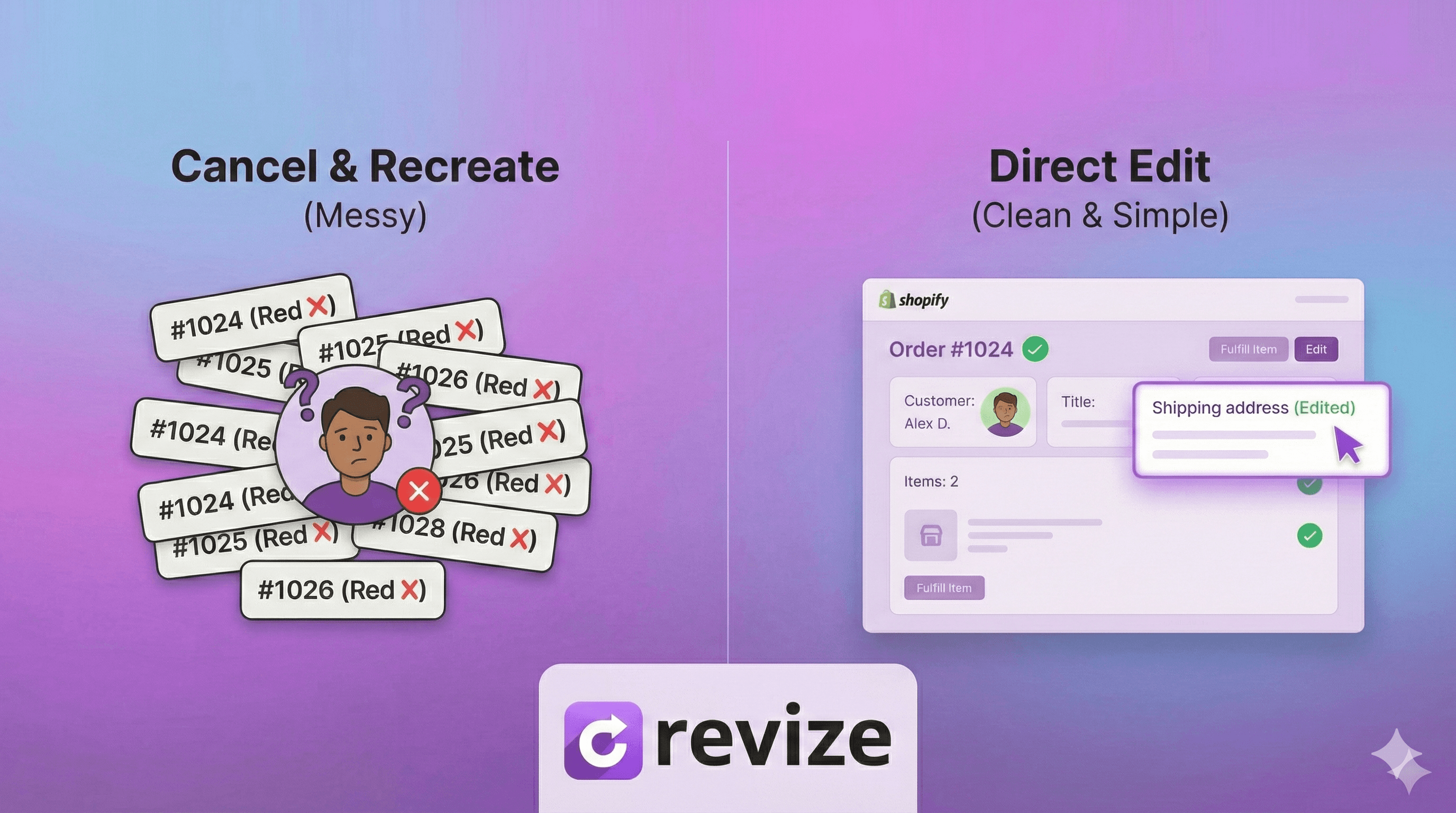
Method 2: Cancel and Recreate the Order
Some merchants just cancel the original order and create a new one. This works, but it's messy.
The Process
Go to the original order
Click More actions → Cancel order
Choose whether to refund and restock
Create a new draft order with the correct address
Send the invoice or mark as paid
Why Merchants Hate This Method
The order number changes. Your original order #1847 becomes canceled, and the new order is #1852. This breaks:
Inventory tracking and reports
Customer communication history
Integration with ERPs and accounting software
Fulfillment partner systems that reference order IDs
For stores doing any volume, this creates reconciliation nightmares. Your books show a canceled order and a new order instead of one clean transaction.
The customer gets confused. They receive a cancellation email, then a new order confirmation. Some customers panic and think something went wrong. Others don't complete the new payment if you're re-invoicing.
It takes forever. What should be a 30-second fix becomes a 5-10 minute process. Multiply that by 10 address change requests per week, and you've lost hours to administrative busywork.
Method 3: Contact the Carrier (Post-Fulfillment)
Once an order is fulfilled and the package is in transit, Shopify can't help you. The address is baked into the shipping label.
Your options depend on the carrier:
USPS
Package Intercept service available for most mail classes
Costs $15.25+ per package
Must be requested before delivery attempt
Not available for all destinations
UPS
Intercept available through UPS My Choice or shipper account
$16.75 for most intercepts
Can redirect to UPS Access Point locations
FedEx
FedEx Delivery Manager allows recipient-initiated redirects
Shipper can request intercept through account
Fees vary by service level
DHL
On Demand Delivery for recipient changes
Shipper intercepts through customer service
International shipments are more complex
The Reality Check
Carrier intercepts are expensive, unreliable, and slow. By the time you've processed the request, the package has often already been delivered (to the wrong address) or is too far along to redirect.
For most merchants, post-fulfillment address changes mean:
Wait for package to be returned to sender
Reship to correct address
Absorb the cost or charge the customer
Neither option makes anyone happy.
Method 4: Let Customers Change Their Own Address
Here's the approach that actually scales: give customers a self-service way to update their shipping address before you fulfill.
Think about it—the customer knows they need to change their address the moment they realize the mistake. That might be:
Immediately after checkout
When they get the confirmation email
When they check the order status
In all these cases, they're on your site or looking at your emails. If they could just... click a button and fix it themselves, they would.
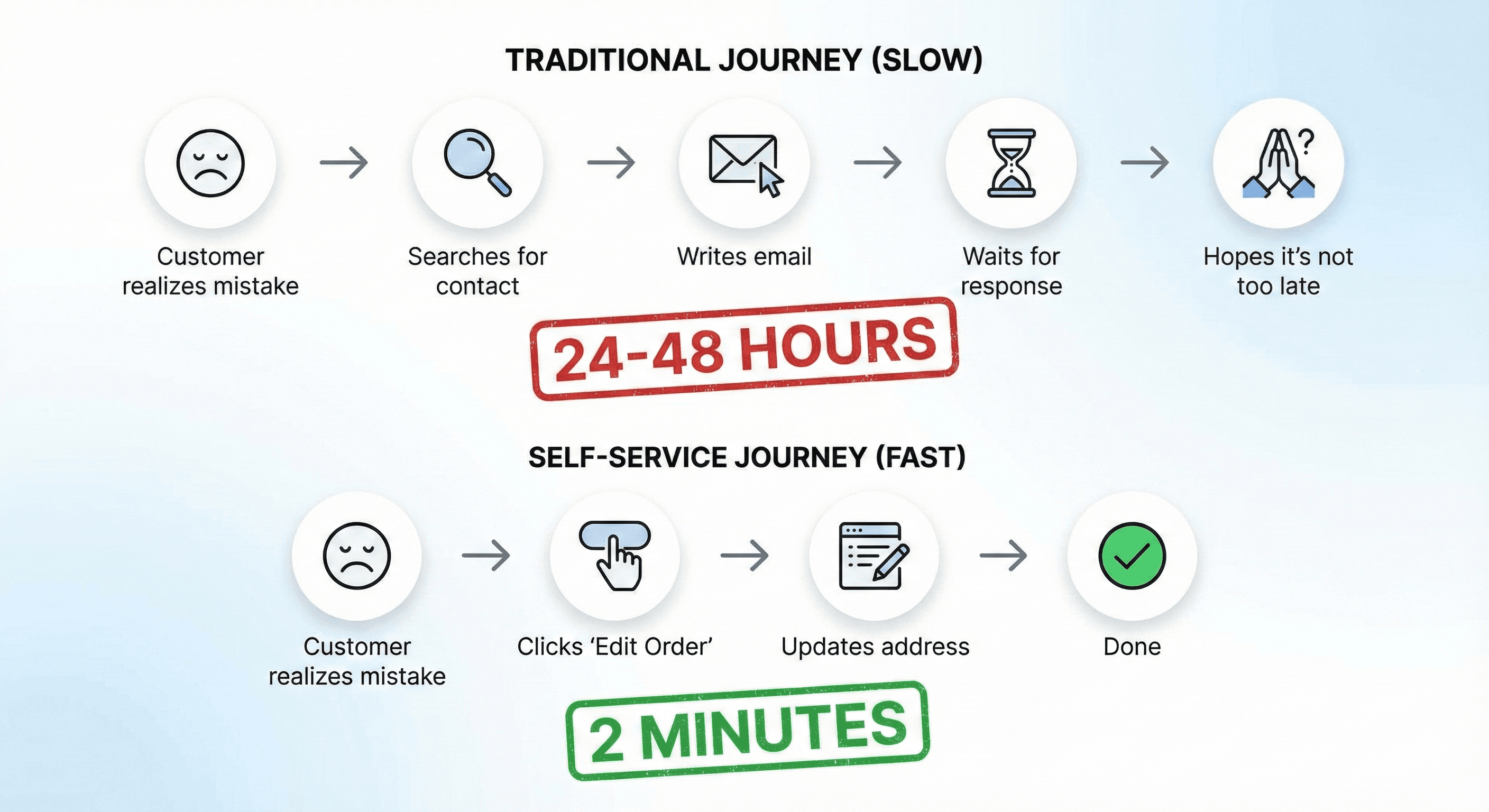
Instead, they have to:
Find your contact email or form
Write out an explanation
Wait for a response
Hope you see it before shipping
That's friction for them and work for you.
How Self-Service Address Changes Work
With a self-service order editing tool, customers can:
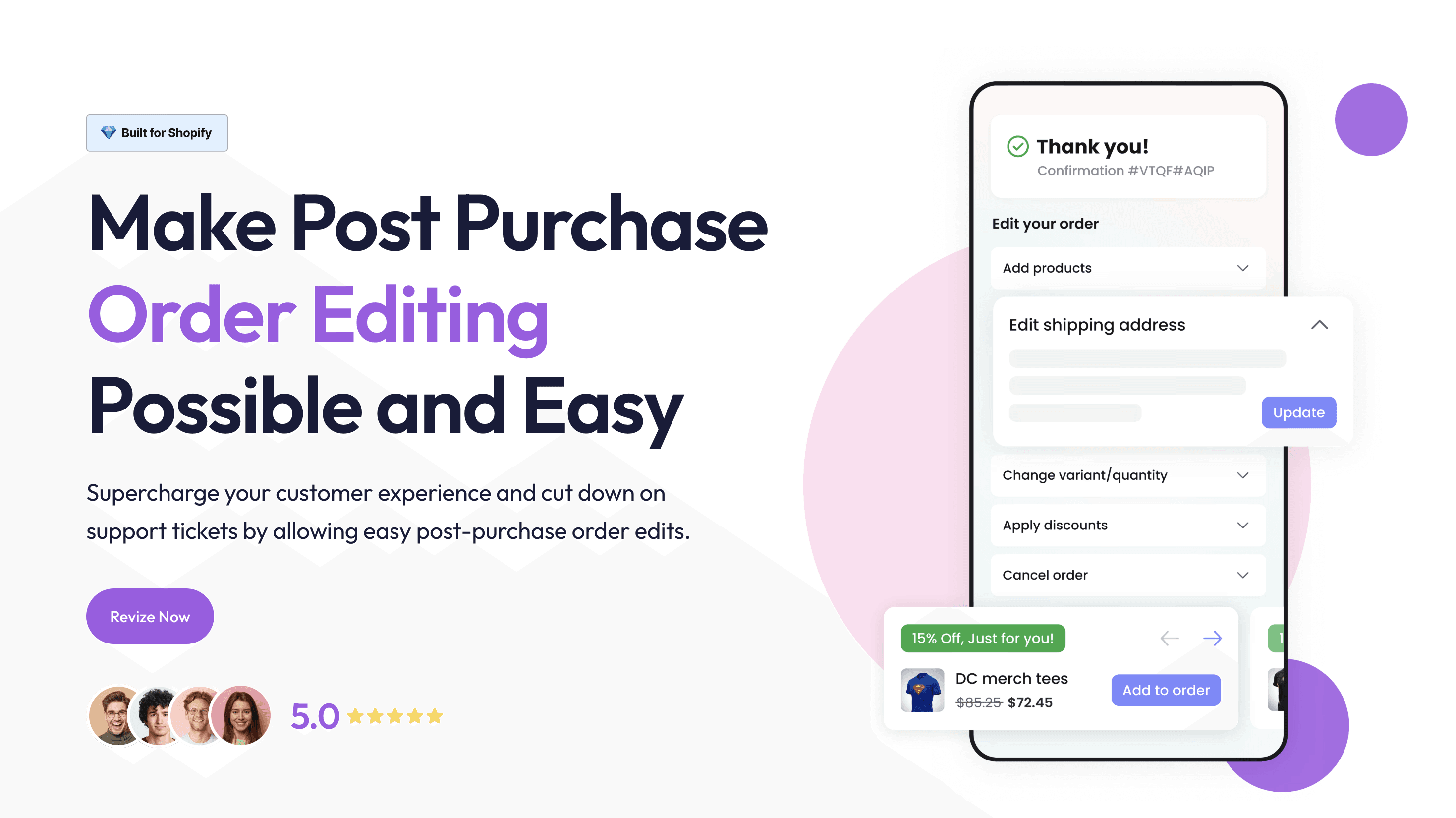
Access their order through your order status page or a link in their confirmation email
Click to edit their shipping address
Make the change themselves
Receive confirmation that the order has been updated
The merchant side:
Order updates automatically in Shopify
Timeline shows the change was made and by whom
Shipping recalculates if you've configured it
No support ticket ever created
This isn't theoretical—it's how modern e-commerce operations handle the volume. When you're shipping hundreds or thousands of orders daily, you can't have a human manually processing address changes.
Revize does this effortlessly.
Customers fix their own address in seconds. Revize recalculates taxes, updates warehouse routing, and prompts the customer to pay if the new address changes the total. Shopify stays fully in sync. Shipping adjusts automatically. Every change is logged in the timeline. Support never has to touch it.
What this really means is fewer tickets, fewer mistakes, and orders that keep moving without slowing your team down. This is how you scale without adding headcount.
Why Shopify Doesn't Offer Native Customer Self-Service
You might be wondering: if this is such a common problem, why doesn't Shopify just let customers edit their own orders?
A few reasons:
Complexity: Order editing touches payments, inventory, shipping calculations, and fulfillment systems. Exposing that to customers without safeguards could create bigger problems than it solves.
Fraud concerns: An unprotected edit function could be exploited—change address after payment clears, redirect packages, etc.
Business logic varies: What changes are acceptable depends on your business. Some stores want to allow any edit; others only allow address changes; others lock orders immediately. One-size-fits-all doesn't work.
Third-party ecosystem: Shopify's model lets apps handle specialized functionality. Order editing apps can provide customized rules and workflows that Shopify's native system can't.
This isn't Shopify being lazy—it's genuinely a hard problem that requires merchant-specific configuration.
Setting Up Customer Self-Service for Address Changes
If you want to let customers change their own shipping addresses, you'll need to add this functionality to your store. Here's what to look for in a solution:
Must-Have Features
Order status page integration: Customers should be able to edit from wherever they're already checking their order—usually the order status page or a link in confirmation emails.
Edit window controls: You need to define when edits are allowed. Most merchants set this based on fulfillment status (only unfulfilled orders) and/or time windows (within 2 hours of ordering).
Automatic shipping and tax recalculation: If the address change affects shipping cost or tax rate, the system should recalculate automatically. Moving from a no-tax state to California? The tax should update. Changing from local to cross-country? Shipping should adjust. The customer sees the updated total and pays the correct amount—no manual math required.
Smart warehouse selection: For multi-location merchants, address changes should trigger warehouse reassignment. If the new address is closer to your West Coast fulfillment center than your East Coast one, the system should route it correctly. This reduces shipping costs and delivery time.
Audit trail: Every change should be logged with timestamp and what was modified. This protects you if there's ever a dispute.
Nice-to-Have Features
Fraud prevention: Rules to flag suspicious changes (e.g., address changed multiple times, changed to known freight forwarder)
Notification controls: Choose whether you're notified of changes or only see them in the order timeline
Partial editing: Let customers change address but not products, or vice versa
Fulfillment holds: Automatically pause fulfillment when an order is being edited
The Business Case for Self-Service
Let's do the math on address change tickets.
The Hidden Cost of Manual Address Changes
Average time to process one address change request:
Read and understand the email: 1-2 minutes
Find the order in Shopify: 1 minute
Edit the address: 1-2 minutes
Respond to customer: 2-3 minutes
Total: 5-8 minutes per request
Support cost per ticket: At $20/hour fully loaded labor cost, that's $1.67-2.67 per address change.
Frequency: A typical store gets address change requests on 2-5% of orders. At 1,000 orders/month, that's 20-50 tickets.
Monthly cost: 20-50 tickets × $2 = $40-100/month just in labor
That doesn't count:
Customer frustration from slow response
Orders shipped to wrong addresses because the ticket was missed
Reshipping costs when packages bounce back
Time spent on back-and-forth clarification emails
The Self-Service ROI
A good self-service tool eliminates 80-90% of these tickets. Customers who can fix the problem themselves don't email you.
The remaining 10-20% are edge cases that legitimately need human review—post-fulfillment changes, complex situations, or customers who can't figure out the self-service flow.
For most stores, the time saved in the first month pays for a self-service order editing tool indefinitely.
Best Practices for Handling Address Changes
Whether you're handling these manually or with self-service tools, some operational practices help:
Set Clear Expectations
Tell customers when and how they can make changes. Add language to:
Order confirmation emails: "Need to change something? Edit your order within 2 hours of placing it."
Order status page: Clear button or link to edit if within window
FAQ page: Explain what's changeable and what's not
When customers know the rules upfront, they act faster (before fulfillment) and complain less when changes aren't possible.
Establish a Fulfillment Buffer
If you fulfill orders immediately, customers have almost no window to make changes. Consider a 1-4 hour buffer between order placement and fulfillment pickup.
This small delay catches most "oops" moments without meaningfully impacting delivery speed. The exception: same-day delivery services where speed is the whole point.
Revize lets you set an edit deadline and optionally hold the order during that window. Shoppers can update their address while the window is open. Once it closes, the order is automatically released and handed off to your fulfillment service, clean, predictable, and no manual follow-ups.
Create Internal SOPs
When you do need to handle address changes manually, have a documented process:
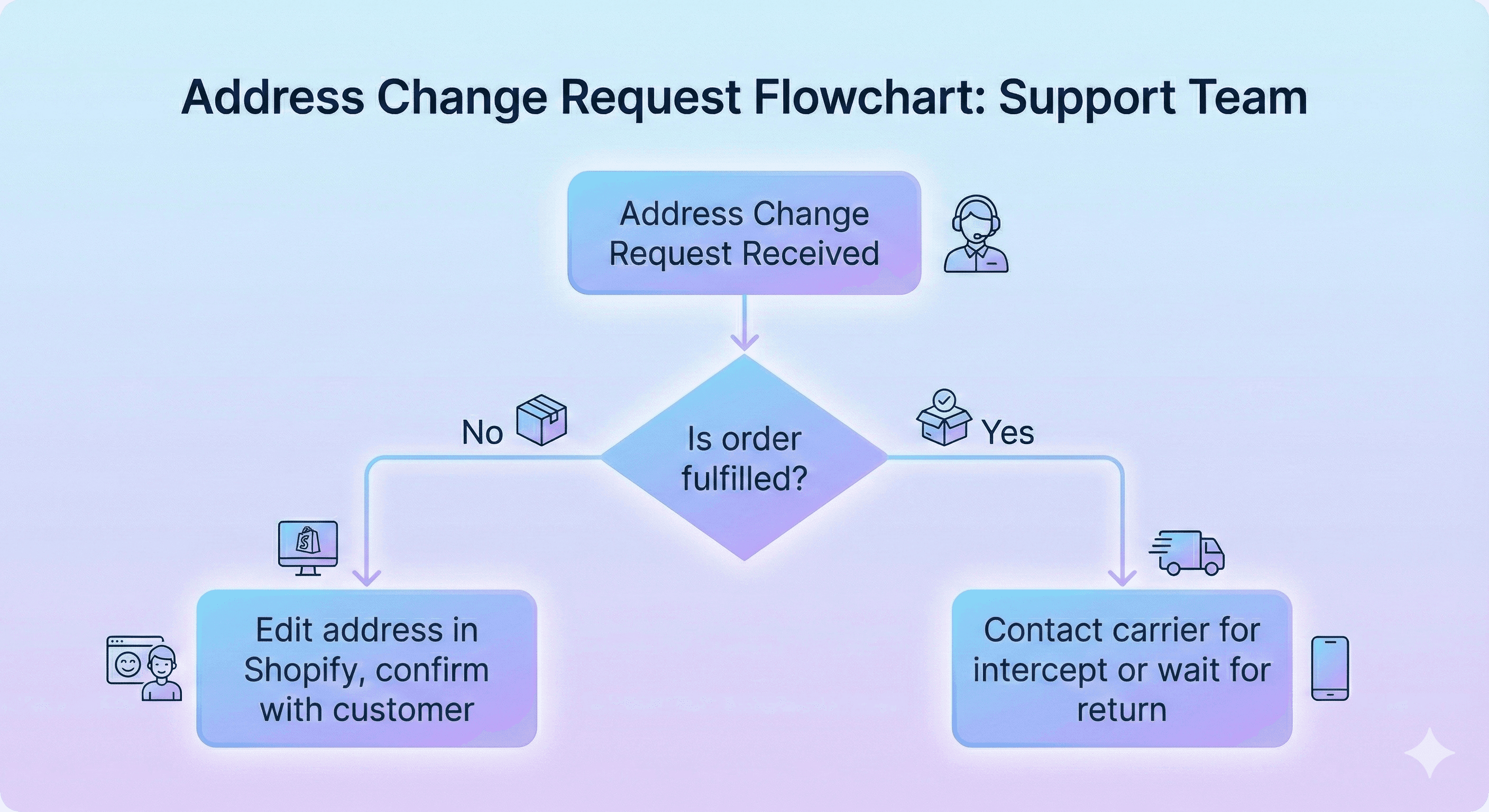
Check fulfillment status first—don't waste time on shipped orders
Verify customer identity (email from same address used on order)
Confirm the complete new address (don't guess at partial info)
Update the order and screenshot/log the original
Confirm back to customer
This prevents the "I changed it to 123 Main St" / "In which city?" / "Oh, I thought you knew" back-and-forth.
Track the Patterns
If 50% of your address change requests come from mobile checkout, you might have a UX problem with your address form on mobile.
If the same customers repeatedly ask for changes, consider requiring address confirmation before shipping for those accounts.
Data helps you fix root causes, not just symptoms.
Common Questions About Shopify Address Changes
Can customers change their address on the order status page?
Not natively. Shopify's order status page shows order details but doesn't allow editing. You need a third-party app like Revize Order Editing & Upsell to add self-service editing capability.
What if the customer provides an incomplete address?
Shopify doesn't validate addresses by default. If a customer enters "123 Main St" without a city, it'll accept it. Use address validation at checkout (via Shopify's native features or apps) to prevent this.
Will changing the address affect my shipping rates?
It depends on how you've configured shipping. If you use calculated rates (carrier-calculated or zone-based), the rate is set at checkout and won't automatically update when you edit the address in Shopify. You'll need to handle the difference manually or use an app that recalculates.
With Revize, you don’t have to worry about it. Shipping rates are automatically recalculated based on the updated address, and any difference is handled for you before the order moves forward.
Can I change a shipping address on a subscription order?
For subscription orders managed through apps like Recharge, Bold, or Skio, address changes usually happen in the subscription portal, not in Shopify’s order admin. Most apps let customers update their address for future orders, but changing an already scheduled order often requires merchant involvement.
Revize removes that friction. For pay-on-delivery subscription orders, once the order is created and the confirmation email is sent, customers can visit the order status page and edit the address for the current order using Revize. For future orders, Revize integrates with Recharge and other subscription platforms, giving customers a clear choice to update the address for just the current order, future orders, or both.
How do I change an address for an order with multiple fulfillments?
If part of the order has already shipped, you can only edit the address for unfulfilled items. The shipped portion is locked to its original address. This is a good reason to avoid partial fulfillments when possible—they create complicated edge cases.
What happens to shipping labels when I change an address?
If you've already purchased a shipping label, you'll need to void it and purchase a new one. Shopify doesn't automatically regenerate labels when addresses change. If using a fulfillment partner or 3PL, check that the updated address syncs to their system before they ship.
The Bigger Picture: Order Editing Beyond Addresses
Address changes are just one type of post-purchase edit. Customers also want to:
Swap product variants (wrong size, wrong color)
Add items they forgot
Remove items they don't want anymore
Apply a discount code they found after checkout
Cancel the entire order
Each of these creates the same support ticket problem. And each has the same solution: give customers the ability to help themselves.
The stores that scale efficiently don't have larger support teams—they have fewer reasons for customers to need support in the first place.

Summary
Changing a shipping address after an order is placed on Shopify is possible, but the native tools are limited:
Unfulfilled orders: Edit directly in order admin (but shipping won't recalculate)
Partially fulfilled: Only unfulfilled portions can be changed
Fulfilled orders: Contact carrier for intercept (expensive, unreliable)
Best approach: Let customers self-serve before fulfillment
The real win isn't just solving individual address changes faster—it's eliminating the ticket entirely by giving customers control over their own orders.
Tired of 'can you change my address?' emails? Revize lets your customers edit their shipping address themselves—and automatically recalculates shipping costs, taxes, and warehouse assignment so you don't leave money on the table. Self-service order editing that actually handles the edge cases. Try it free →
Related Resources
Updated August 2026. Revize is a Shopify app for customer self-serve post-purchase order editing, letting shoppers change the shipping address, swap a variant or product, cancel, and get a refund or store credit before fulfillment, without a support ticket. Learn more about letting customers edit their own Shopify orders, or find Revize on the Shopify App Store.
"Hi, I just placed an order but I put in the wrong address. Can you fix it?"
If you run a Shopify store, you've seen this email. Probably today. Maybe twice.
Address change requests are one of the most common support tickets in e-commerce, and the data backs that up: shipping-address changes are the #1 post-purchase edit, accounting for 30.2% of all edited orders (Revize, 2026). Customer was shipping to their office but checkout autofilled their home address. They're traveling and need it sent somewhere else. They moved last month and forgot to update their saved address.
The frustrating part? Shopify doesn't make this easy to fix.
This guide covers every method to change a shipping address after an order is placed—what works, what doesn't, and how to stop these tickets from hitting your inbox in the first place.
Can You Change a Shipping Address on Shopify After Checkout?
The short answer: Yes, but it depends on the order status.
Here's the reality:
Order Status | Can You Change Address? | Method |
|---|---|---|
Unfulfilled | Yes | Edit order or cancel/recreate |
Partially fulfilled | Limited | Only for unfulfilled items |
Fulfilled | No | Contact carrier directly |
Archived | No | Too late |
Shopify's native order editing has improved over the years, but address changes remain clunky. There's no dedicated "change address" button—you have to know where to look and understand the limitations.
Let's walk through each method.
Method 1: Edit the Order Directly (Native Shopify)
This is the simplest approach for unfulfilled orders, but it comes with a catch most merchants don't realize.
Step-by-Step Process
Go to Orders in your Shopify admin
Click on the order you need to modify
In the Shipping address section, click the pencil icon (Edit)
Update the address fields
Click Save
That's it for the address itself. But here's what Shopify doesn't tell you upfront:
The Shipping Cost Problem
When you edit a shipping address, the shipping cost doesn't automatically recalculate.
If a customer ordered with free local delivery and now wants it shipped to another state, you're stuck with:
Option A: Honor the original shipping cost (you eat the difference)
Option B: Manually calculate the new rate and request additional payment
Option C: Cancel and ask them to reorder (terrible customer experience)
None of these are good. For stores with zone-based or weight-based shipping, a simple address change can mean a $15+ swing in shipping costs that Shopify won't catch automatically.
The same problem exists for taxes. A customer changing from Oregon (no sales tax) to California (up to 10.25%) creates a tax liability Shopify won't automatically capture. You're either eating the cost or manually chasing the customer for a few extra dollars.
Self-service tools like Revize- Order Editing & Upsell handle this automatically—when a customer changes their address, shipping costs, taxes, and even warehouse assignment recalculate in real-time. No manual adjustments, no revenue leakage.
When This Method Works Best
Address typos (wrong apartment number, misspelled street)
Same shipping zone changes (across town, not across country)
Orders where you offer flat-rate shipping anyway
When This Method Falls Short
Customer moving to a different shipping zone
International address changes
Orders with calculated shipping rates
Method 2: Cancel and Recreate the Order
Some merchants just cancel the original order and create a new one. This works, but it's messy.
The Process
Go to the original order
Click More actions → Cancel order
Choose whether to refund and restock
Create a new draft order with the correct address
Send the invoice or mark as paid
Why Merchants Hate This Method
The order number changes. Your original order #1847 becomes canceled, and the new order is #1852. This breaks:
Inventory tracking and reports
Customer communication history
Integration with ERPs and accounting software
Fulfillment partner systems that reference order IDs
For stores doing any volume, this creates reconciliation nightmares. Your books show a canceled order and a new order instead of one clean transaction.
The customer gets confused. They receive a cancellation email, then a new order confirmation. Some customers panic and think something went wrong. Others don't complete the new payment if you're re-invoicing.
It takes forever. What should be a 30-second fix becomes a 5-10 minute process. Multiply that by 10 address change requests per week, and you've lost hours to administrative busywork.
Method 3: Contact the Carrier (Post-Fulfillment)
Once an order is fulfilled and the package is in transit, Shopify can't help you. The address is baked into the shipping label.
Your options depend on the carrier:
USPS
Package Intercept service available for most mail classes
Costs $15.25+ per package
Must be requested before delivery attempt
Not available for all destinations
UPS
Intercept available through UPS My Choice or shipper account
$16.75 for most intercepts
Can redirect to UPS Access Point locations
FedEx
FedEx Delivery Manager allows recipient-initiated redirects
Shipper can request intercept through account
Fees vary by service level
DHL
On Demand Delivery for recipient changes
Shipper intercepts through customer service
International shipments are more complex
The Reality Check
Carrier intercepts are expensive, unreliable, and slow. By the time you've processed the request, the package has often already been delivered (to the wrong address) or is too far along to redirect.
For most merchants, post-fulfillment address changes mean:
Wait for package to be returned to sender
Reship to correct address
Absorb the cost or charge the customer
Neither option makes anyone happy.
Method 4: Let Customers Change Their Own Address
Here's the approach that actually scales: give customers a self-service way to update their shipping address before you fulfill.
Think about it—the customer knows they need to change their address the moment they realize the mistake. That might be:
Immediately after checkout
When they get the confirmation email
When they check the order status
In all these cases, they're on your site or looking at your emails. If they could just... click a button and fix it themselves, they would.
Instead, they have to:
Find your contact email or form
Write out an explanation
Wait for a response
Hope you see it before shipping
That's friction for them and work for you.
How Self-Service Address Changes Work
With a self-service order editing tool, customers can:
Access their order through your order status page or a link in their confirmation email
Click to edit their shipping address
Make the change themselves
Receive confirmation that the order has been updated
The merchant side:
Order updates automatically in Shopify
Timeline shows the change was made and by whom
Shipping recalculates if you've configured it
No support ticket ever created
This isn't theoretical—it's how modern e-commerce operations handle the volume. When you're shipping hundreds or thousands of orders daily, you can't have a human manually processing address changes.
Revize does this effortlessly.
Customers fix their own address in seconds. Revize recalculates taxes, updates warehouse routing, and prompts the customer to pay if the new address changes the total. Shopify stays fully in sync. Shipping adjusts automatically. Every change is logged in the timeline. Support never has to touch it.
What this really means is fewer tickets, fewer mistakes, and orders that keep moving without slowing your team down. This is how you scale without adding headcount.
Why Shopify Doesn't Offer Native Customer Self-Service
You might be wondering: if this is such a common problem, why doesn't Shopify just let customers edit their own orders?
A few reasons:
Complexity: Order editing touches payments, inventory, shipping calculations, and fulfillment systems. Exposing that to customers without safeguards could create bigger problems than it solves.
Fraud concerns: An unprotected edit function could be exploited—change address after payment clears, redirect packages, etc.
Business logic varies: What changes are acceptable depends on your business. Some stores want to allow any edit; others only allow address changes; others lock orders immediately. One-size-fits-all doesn't work.
Third-party ecosystem: Shopify's model lets apps handle specialized functionality. Order editing apps can provide customized rules and workflows that Shopify's native system can't.
This isn't Shopify being lazy—it's genuinely a hard problem that requires merchant-specific configuration.
Setting Up Customer Self-Service for Address Changes
If you want to let customers change their own shipping addresses, you'll need to add this functionality to your store. Here's what to look for in a solution:
Must-Have Features
Order status page integration: Customers should be able to edit from wherever they're already checking their order—usually the order status page or a link in confirmation emails.
Edit window controls: You need to define when edits are allowed. Most merchants set this based on fulfillment status (only unfulfilled orders) and/or time windows (within 2 hours of ordering).
Automatic shipping and tax recalculation: If the address change affects shipping cost or tax rate, the system should recalculate automatically. Moving from a no-tax state to California? The tax should update. Changing from local to cross-country? Shipping should adjust. The customer sees the updated total and pays the correct amount—no manual math required.
Smart warehouse selection: For multi-location merchants, address changes should trigger warehouse reassignment. If the new address is closer to your West Coast fulfillment center than your East Coast one, the system should route it correctly. This reduces shipping costs and delivery time.
Audit trail: Every change should be logged with timestamp and what was modified. This protects you if there's ever a dispute.
Nice-to-Have Features
Fraud prevention: Rules to flag suspicious changes (e.g., address changed multiple times, changed to known freight forwarder)
Notification controls: Choose whether you're notified of changes or only see them in the order timeline
Partial editing: Let customers change address but not products, or vice versa
Fulfillment holds: Automatically pause fulfillment when an order is being edited
The Business Case for Self-Service
Let's do the math on address change tickets.
The Hidden Cost of Manual Address Changes
Average time to process one address change request:
Read and understand the email: 1-2 minutes
Find the order in Shopify: 1 minute
Edit the address: 1-2 minutes
Respond to customer: 2-3 minutes
Total: 5-8 minutes per request
Support cost per ticket: At $20/hour fully loaded labor cost, that's $1.67-2.67 per address change.
Frequency: A typical store gets address change requests on 2-5% of orders. At 1,000 orders/month, that's 20-50 tickets.
Monthly cost: 20-50 tickets × $2 = $40-100/month just in labor
That doesn't count:
Customer frustration from slow response
Orders shipped to wrong addresses because the ticket was missed
Reshipping costs when packages bounce back
Time spent on back-and-forth clarification emails
The Self-Service ROI
A good self-service tool eliminates 80-90% of these tickets. Customers who can fix the problem themselves don't email you.
The remaining 10-20% are edge cases that legitimately need human review—post-fulfillment changes, complex situations, or customers who can't figure out the self-service flow.
For most stores, the time saved in the first month pays for a self-service order editing tool indefinitely.
Best Practices for Handling Address Changes
Whether you're handling these manually or with self-service tools, some operational practices help:
Set Clear Expectations
Tell customers when and how they can make changes. Add language to:
Order confirmation emails: "Need to change something? Edit your order within 2 hours of placing it."
Order status page: Clear button or link to edit if within window
FAQ page: Explain what's changeable and what's not
When customers know the rules upfront, they act faster (before fulfillment) and complain less when changes aren't possible.
Establish a Fulfillment Buffer
If you fulfill orders immediately, customers have almost no window to make changes. Consider a 1-4 hour buffer between order placement and fulfillment pickup.
This small delay catches most "oops" moments without meaningfully impacting delivery speed. The exception: same-day delivery services where speed is the whole point.
Revize lets you set an edit deadline and optionally hold the order during that window. Shoppers can update their address while the window is open. Once it closes, the order is automatically released and handed off to your fulfillment service, clean, predictable, and no manual follow-ups.
Create Internal SOPs
When you do need to handle address changes manually, have a documented process:
Check fulfillment status first—don't waste time on shipped orders
Verify customer identity (email from same address used on order)
Confirm the complete new address (don't guess at partial info)
Update the order and screenshot/log the original
Confirm back to customer
This prevents the "I changed it to 123 Main St" / "In which city?" / "Oh, I thought you knew" back-and-forth.
Track the Patterns
If 50% of your address change requests come from mobile checkout, you might have a UX problem with your address form on mobile.
If the same customers repeatedly ask for changes, consider requiring address confirmation before shipping for those accounts.
Data helps you fix root causes, not just symptoms.
Common Questions About Shopify Address Changes
Can customers change their address on the order status page?
Not natively. Shopify's order status page shows order details but doesn't allow editing. You need a third-party app like Revize Order Editing & Upsell to add self-service editing capability.
What if the customer provides an incomplete address?
Shopify doesn't validate addresses by default. If a customer enters "123 Main St" without a city, it'll accept it. Use address validation at checkout (via Shopify's native features or apps) to prevent this.
Will changing the address affect my shipping rates?
It depends on how you've configured shipping. If you use calculated rates (carrier-calculated or zone-based), the rate is set at checkout and won't automatically update when you edit the address in Shopify. You'll need to handle the difference manually or use an app that recalculates.
With Revize, you don’t have to worry about it. Shipping rates are automatically recalculated based on the updated address, and any difference is handled for you before the order moves forward.
Can I change a shipping address on a subscription order?
For subscription orders managed through apps like Recharge, Bold, or Skio, address changes usually happen in the subscription portal, not in Shopify’s order admin. Most apps let customers update their address for future orders, but changing an already scheduled order often requires merchant involvement.
Revize removes that friction. For pay-on-delivery subscription orders, once the order is created and the confirmation email is sent, customers can visit the order status page and edit the address for the current order using Revize. For future orders, Revize integrates with Recharge and other subscription platforms, giving customers a clear choice to update the address for just the current order, future orders, or both.
How do I change an address for an order with multiple fulfillments?
If part of the order has already shipped, you can only edit the address for unfulfilled items. The shipped portion is locked to its original address. This is a good reason to avoid partial fulfillments when possible—they create complicated edge cases.
What happens to shipping labels when I change an address?
If you've already purchased a shipping label, you'll need to void it and purchase a new one. Shopify doesn't automatically regenerate labels when addresses change. If using a fulfillment partner or 3PL, check that the updated address syncs to their system before they ship.
The Bigger Picture: Order Editing Beyond Addresses
Address changes are just one type of post-purchase edit. Customers also want to:
Swap product variants (wrong size, wrong color)
Add items they forgot
Remove items they don't want anymore
Apply a discount code they found after checkout
Cancel the entire order
Each of these creates the same support ticket problem. And each has the same solution: give customers the ability to help themselves.
The stores that scale efficiently don't have larger support teams—they have fewer reasons for customers to need support in the first place.
Summary
Changing a shipping address after an order is placed on Shopify is possible, but the native tools are limited:
Unfulfilled orders: Edit directly in order admin (but shipping won't recalculate)
Partially fulfilled: Only unfulfilled portions can be changed
Fulfilled orders: Contact carrier for intercept (expensive, unreliable)
Best approach: Let customers self-serve before fulfillment
The real win isn't just solving individual address changes faster—it's eliminating the ticket entirely by giving customers control over their own orders.
Tired of 'can you change my address?' emails? Revize lets your customers edit their shipping address themselves—and automatically recalculates shipping costs, taxes, and warehouse assignment so you don't leave money on the table. Self-service order editing that actually handles the edge cases. Try it free →
Related Resources
Updated August 2026. Revize is a Shopify app for customer self-serve post-purchase order editing, letting shoppers change the shipping address, swap a variant or product, cancel, and get a refund or store credit before fulfillment, without a support ticket. Learn more about letting customers edit their own Shopify orders, or find Revize on the Shopify App Store.


Revize your Shopify store. Lead with customer experience.

© Copyright 2026, All Rights Reserved
Revize your Shopify store. Lead with customer experience.
© Copyright 2026, All Rights Reserved
Revize your Shopify store. Lead with customer experience.
© Copyright 2026, All Rights Reserved
Revize your Shopify store. Lead with customer experience.
© Copyright 2026, All Rights Reserved